


Code Like a Pro—Mind Map Your Way to Programming Genius.
Crack the Code Without the Confusion

Ever tried learning to code and felt like your brain was short-circuiting? You’re not alone. Programming languages are complex, full of syntax rules, logic puzzles, and endless lines of code that can make even the most determined learner feel overwhelmed.
But what if I told you there’s a better way?
Forget struggling with endless tutorials and notes that look like they’ve been written in an alien language. Hand-drawn Mind Mapping is your secret weapon for mastering programming—helping you see the bigger picture, break down concepts, and actually retain what you learn.
Whether you’re a total newbie or levelling up your dev skills, these four expert secrets will help you code smarter, faster, and with way less stress.
🖥️ Secret #1: Break Down Complex Concepts with Mind Maps

Instead of drowning in pages of notes, create a Mind Map for each topic, breaking it down into clear, visual categories.
🎯 How to do it:
✅ Central Image: Start with the programming language you’re learning (e.g., Python 🐍, Java ☕, or JavaScript 💻).
✅ Branches = Key Concepts: Syntax, variables, loops, functions, data structures, debugging.
✅ Sub-branches = Specific Examples: Under "Loops," include for loops, while loops, recursion, and example snippets.
✅ Use colour-coding: Different colours for different concepts (e.g., red for errors, green for correct syntax).
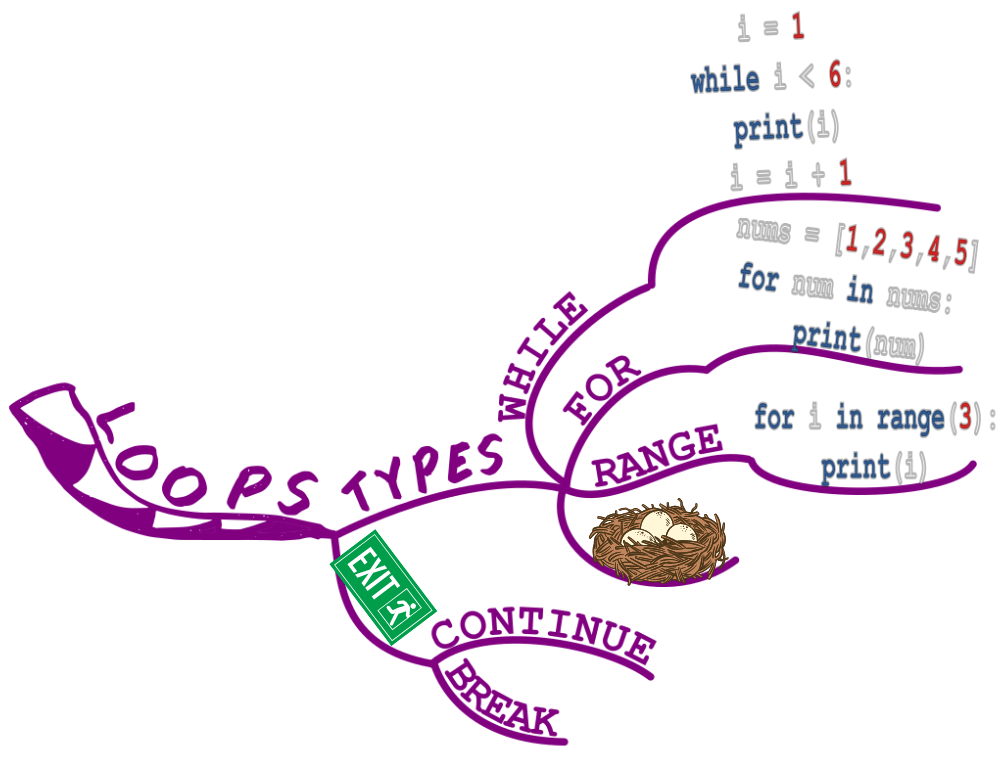
🔥 Why This Works:
✔ Your brain retains visuals faster than text—you’ll recall syntax and rules more easily.
✔ Instead of jumping from one tutorial to another, you have a clear reference map at a glance.
👨💻 Secret #2: Debug Smarter, Not Harder

Let’s face it—debugging is frustrating. Finding that one missing semicolon or misplaced bracket can take hours.
But what if you could spot errors faster and fix them efficiently?
Solution: Use Mind Maps for Debugging Strategy
Coding isn’t just about writing—it’s about problem-solving. A Mind Map can help you track and troubleshoot issues systematically.
🎯 How to do it:
✅ Central Image: “Debugging Strategy” 🛠
✅ Branches = Common Errors: Syntax errors, logic errors, runtime errors.
✅ Sub-branches = Fixes & Solutions: Example error messages, debugging techniques, common mistakes to avoid.
✅ Include real-world bugs: Whenever you fix a tricky bug, add it to your map so you remember how to solve it next time.
🔥 Why This Works:
✔ Debugging becomes structured instead of chaotic—you know exactly where to look for errors.
✔ You create a growing knowledge bank of past mistakes, so you don’t repeat them.
🧩 Secret #3: Master Multiple Programming Languages with Mind Maps
If you’re serious about coding, you’ll likely dabble in multiple languages—but keeping track of their differences can be a nightmare.
Solution: Compare Languages with Side-by-Side Mind Maps
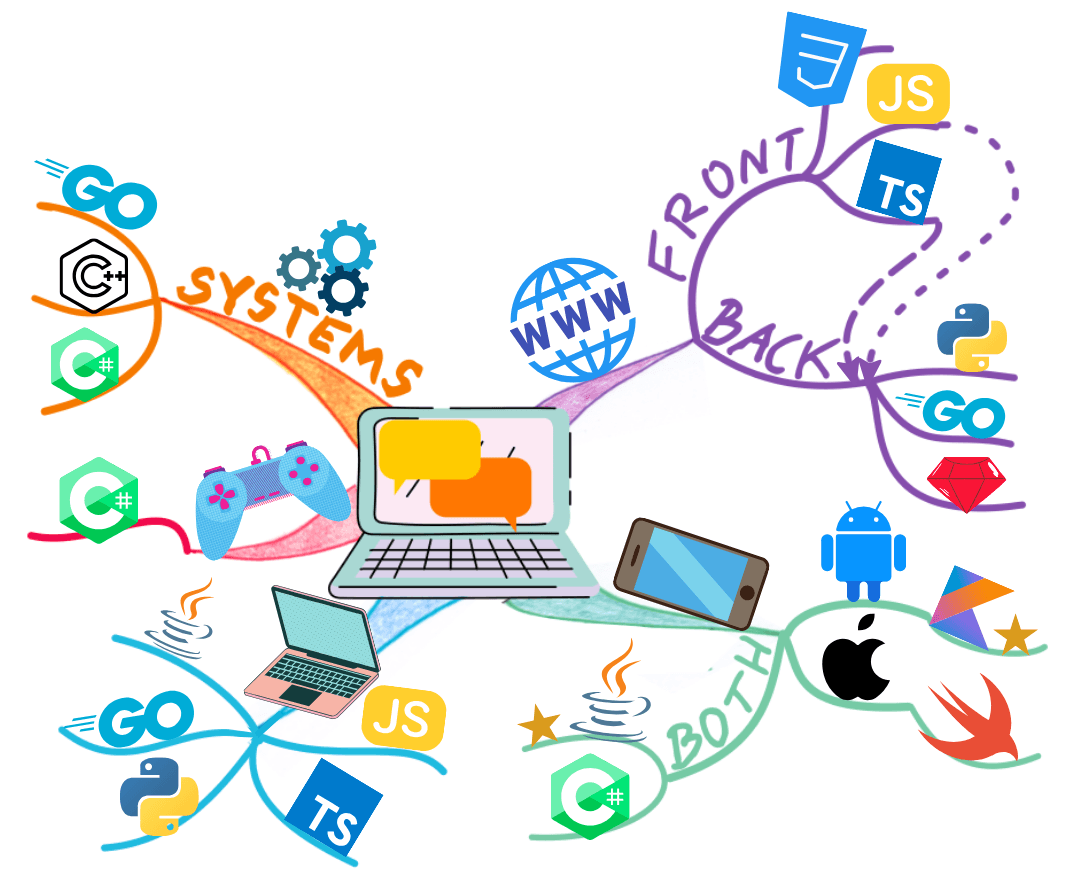
Instead of learning one language at a time, use Mind Maps to spot patterns and similarities—making it easier to switch between languages like a pro.
🎯 How to do it:
✅ Create a central Mind Map called “Programming Languages”
✅ Branches = Each Language (Python, Java, C++, JavaScript, etc.)
✅ Sub-branches = Core Features: Syntax, functions, variables, object-oriented vs. procedural, strengths & weaknesses.
✅ Add practical notes: What’s each language best for? Web dev? AI? Game dev? Write down key use cases.
🔥 Why This Works:
✔ You learn smarter, not harder—seeing similarities helps you learn new languages faster.
✔ It’s way easier to recall syntax differences when you can visualise them side by side.
🚀 Secret #4: Plan and Build Projects with Mind Maps
Want to actually create something awesome with your coding skills? A major roadblock for new programmers is not knowing how to start a project.
Solution: Map Out Your Code Before You Write It

Mind Mapping helps you design software before you start coding—saving time and reducing errors.
🎯 How to do it:
✅ Start with a central idea: Your project (e.g., “To-Do List App” 📋).
✅ Branches = Main Features: User login, task creation, deadlines, notifications.
✅ Sub-branches = Technical Details: Frontend (HTML, CSS, JavaScript), Backend (Node.js, Python), Database (MySQL, MongoDB).
✅ Plan the logic visually: Draw flowcharts within your Mind Map to see how data moves through your app.
🔥 Why This Works:
✔ You avoid coding yourself into a corner—you know exactly what you’re building.
✔ Complex projects feel simpler and more structured—making it easier to stay motivated.
🎯 Final Thoughts: Code Smarter with Mind Mapping

Coding doesn’t have to be a chaotic, hair-pulling experience. Mind Mapping turns programming into a structured, visual process that helps you:
✔ Understand key concepts faster
✔ Debug with confidence
✔ Master multiple languages easily
✔ Plan and execute coding projects efficiently
Programming is not just about learning syntax—it’s about thinking logically and solving problems. And that’s exactly what Mind Mapping helps you do better.
📢 Ready to Code Like a Pro?
Use Mind Maps to master Programming and Computer Science.
🎉 Join The Million Mind Map Newsletter today for your weekly round-up of expert tips and be the first to hear all the latest from Mind Mapping Expert HQ.
👉 Sign up for the free Newsletter here.
Now grab your pens, sketch your next big project, and code like a boss! 💻🔥

Categories

THE PROJECT
(2)

MIND MAPPING
(2)

JOIN IN
(2)

Latest Posts

About me

Hi there 👋 My name is Elaine Colliar, 5 Times World Mind Mapping Champion and your Mentor in Mind Mapping!

Ready to Think Smarter? Join Our Free Mind Mapping Community!
Learn directly from TWO World Champions in Mind Mapping, get exclusive resources, and connect with like-minded thinkers who are transforming their productivity, careers, and creativity.

Get Smarter, One Weekly Idea at a Time
We simplify all our Mind Mapping news for you. Get the week's best insights, tips and news—all curated and delivered in one weekly digest. Organise your thinking, unlock creativity, and achieve more with less effort.
© 2025 The Mind Mapping Expert Ltd